
You may not have a data plan for your phone or you may be out of range with a cell tower. There could be other reason that you cannot access the website. That is why all the images of weeds on the website can be downloaded to your phone. First you need to download and upzip the file below to your desktop. Once the file has been extracted you need to upload it to your phone.
Android Phones:
Simply plug the phone into your computer and turn on USB Storage. This should bring up a screen on your computer similar to this.
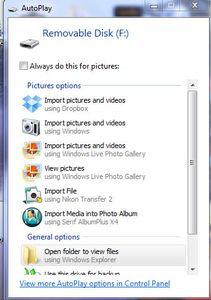
Click on the open folder to view files option and then scroll down until you are aat the bottom of the list. Now drag and drop the unzipped weeds file until it is at the bottom of the list of files on your phone, making sure that it not inside another folder. The gallery feature of your phone will automatically index the pictures.
iPhone
Plug in your iPhone and launch iTunes. Click on your iPhone, and under the Photos tab at the top, tick off the appropriate folders you want your iPhone to sync with (these being the folders you just created and renamed). Next, sync your iPhone and organized folders on your iPhone will appear!
Download Weed Images